

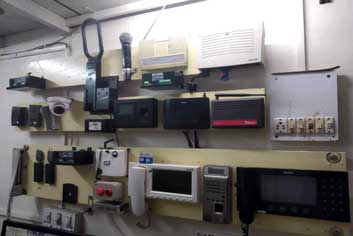
Mosque CCTV and Security Systems: A Practical Guide for UK Masjid Committees
Keeping a masjid safe is one of the most important responsibilities a committee carries. Worshippers, children attending weekend classes, and staff deserve a welcoming space where they feel protected. Thoughtful investment in mosque security systems UK committees can rely on helps achieve that goal without turning the building into a fortress.
This guide walks through the key decisions, from assessing risk to choosing equipment and staying on the right side of data protection law.
Start With a Security Risk Assessment
Before buying a single camera, carry out a simple risk assessment. This gives your committee a clear picture of what you are protecting and where the gaps are.
Questions to Ask
- Which entrances are used most, and which are rarely watched?
- Are there blind spots in car parks, side alleys, or garden areas?
- Has the building experienced anti-social behaviour, vandalism, or theft?
- When is the site busiest, and when is it empty?
- Who holds keys, and how are they tracked?
Record your findings in a short document. This will help justify funding to your committee and to any grant body you approach later.
Understanding the Main Types of Security Equipment
Modern mosque security systems UK providers offer usually combine several layers of protection. Each has a role.
CCTV Cameras
Cameras are the most visible part of any system. Good placement matters more than the number of cameras. Focus on:
- Main entrances and exits
- Car parks and bicycle areas
- Wudu areas and side access routes
- Reception or office areas where valuables may be kept
Intruder Alarms
Intruder alarms detect unauthorised entry, typically through door contacts and motion sensors. Monitored alarms, where a response is triggered automatically, offer faster protection than local alarms that rely on passers-by to notice.
Access Control
Access control systems, such as keypads, fobs, or door entry panels, let you control who enters and when. These are particularly useful for separating public areas from classrooms or administrative offices.
Lighting and Physical Barriers
Motion-activated lighting deters intruders and improves camera image quality at night. Sturdy doors, window locks, and well-maintained boundary walls or railings add an important physical layer.
Choosing the Right Camera Setup
Not all cameras are equal. When comparing options, consider:
- Resolution: Higher resolution helps identify faces and number plates. Full HD or better is generally recommended for entrances.
- Night vision: Infrared capability is essential for car parks and external areas.
- Storage: Decide between on-site recorders (NVRs) and cloud storage, and confirm how long footage is kept.
- Remote viewing: Authorised committee members should be able to check footage securely from a phone or computer.
- Weatherproofing: External cameras should carry a suitable IP rating for UK conditions.
Ask installers for a site survey and a written quote that explains what is included, including maintenance and warranty terms.
Data Protection and Legal Responsibilities
CCTV captures personal data, so your masjid must comply with UK data protection law, including the UK GDPR and the Data Protection Act 2018. The Information Commissioner’s Office (ICO) provides detailed guidance for organisations operating surveillance systems.
Key Steps
- Register with the ICO if required for your organisation.
- Display clear signage informing people that CCTV is in operation and who to contact.
- Limit the scope so cameras point at areas that genuinely need monitoring. Avoid pointing cameras into private homes or neighbouring gardens.
- Restrict access to footage to named, trusted individuals.
- Set a retention period, commonly around 30 days unless there is a specific reason to keep recordings longer.
- Respond to subject access requests within the required timeframe.
Audio recording needs particular care, as it is more intrusive and generally requires a stronger justification.
Involve the Community
Security works best when the community understands and supports it. Share your plans at a committee meeting or community gathering. Explain why the system is being installed, how footage is protected, and who can access it. Transparency builds trust and reduces the feeling that the masjid is watching its own congregation.
Consider working with local police, neighbourhood watch schemes, and your local council’s community safety team. Many forces offer free or low-cost security advice for places of worship.
Maintenance and Ongoing Review
A system is only as good as its upkeep. Schedule regular checks to ensure:
- Cameras are clean and angled correctly
- Recordings are working and stored properly
- Alarm batteries and sensors are tested
- Access permissions are updated when volunteers or staff change
Review your risk assessment at least once a year, especially after any incident or building change.
Final Thoughts
Effective mosque security systems UK masjid committees can trust combine sensible equipment, clear policies, and respect for data protection law. Start with a risk assessment, choose proportionate technology, inform your community, and maintain your setup over time. With careful planning, your masjid can remain a place of peace, prayer, and belonging for everyone who walks through its doors.